WYSIWYG
In ApplyCycle, editors use the text editor to format text in content fields. The Text Format setting lets editors choose Basic HTML or Full HTML. Applicants use Basic HTML for formatted text. Editors can add links to pages on the site or to external web addresses.
The WYSIWYG is found throughout the site wherever formatted text can be added.
On content pages, editors can change the Text Format below a WYSIWYG from Basic HTML to Full HTML. Applicants can only use Basic HTML text format. Basic HTML text format limits the HTML tags (and corresponding WYSIWYG buttons) for security and simplicity. Full HTML allows any HTML and can be used as necessary.
Basic HTML
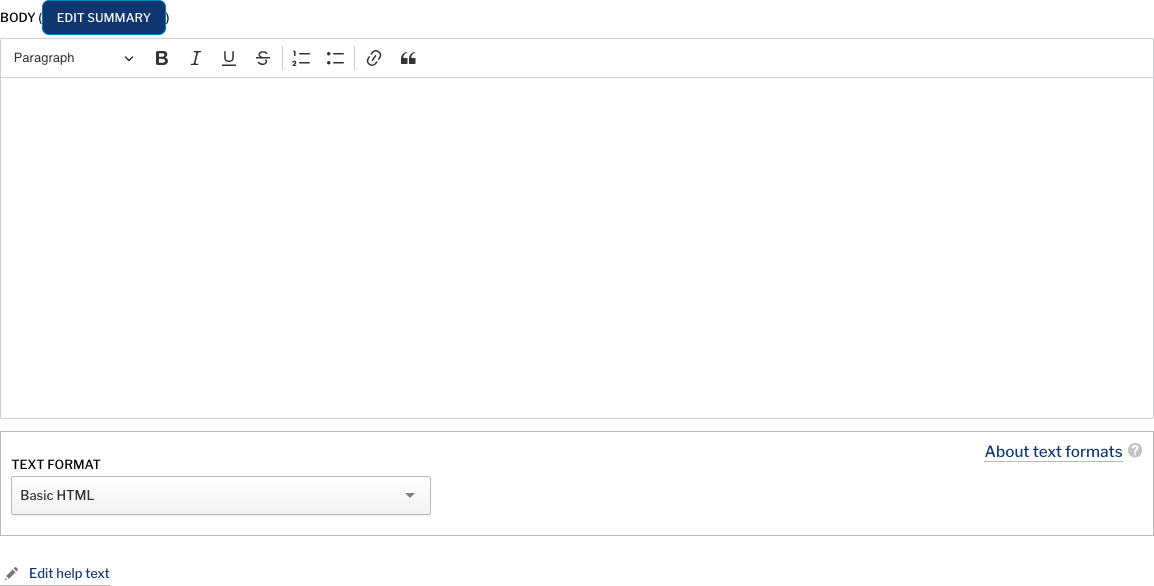
The buttons on the WYSIWYG for Basic HTML include:
- Bold, Italic, Underline, and Strikethrough
- Link
- Numbered list and Bulleted list
- Block quote
- Heading
Pressing Enter/Return adds a new paragraph in the WYSIWYG. To add a line break only, press SHIFT-ENTER.
Adding Links
Highlight the text you want to link and click on the link button in the WYSIWYG.
For an external link, paste the URL that you want to link to.
For an internal link, do not include the full URL. A link to https://my-apply-cycle.com/contact should be entered in as /contact.
Full HTML
The buttons on the WYSIWYG for Full HTML include:
- Bold, Italic, Underline, and Strikethrough
- Superscript and Subscript
- Remove format
- Link
- Bulleted list, Numbered list, Outdent, and Indent
- Block quote, Image, Media embed, Table, Horizontal line, and Special characters
- Accordion, Heading, Div container, and Styles
- Text alignment, Undo, Redo, and Show blocks
- Token browser and Source